
When you shop for a mechanical keyboard in India, the first decision is usually the size. A full-size keyboard has 104 keys. A 60 percent keyboard has around 61. Between those two points are several layouts, each with a different balance of compactness and functionality. The size you choose affects your desk space, your workflow, and how much you will need to rely on function layers to access keys that are missing.

This guide explains each keyboard layout, its key count, what it removes compared to full-size, and who it suits. By the end, you will know which size matches your use case.
All Keyboard Sizes Quick Comparison
|
Layout |
Keys |
Has Numpad |
Has Fn Row |
Has Nav Keys |
Size |
|
Full-Size (100%) |
104 |
Yes |
Yes |
Yes |
Largest |
|
1800-Compact (96%) |
96 |
Yes |
Yes |
Yes |
Slightly smaller |
|
TKL (80%) |
87 |
No |
Yes |
Yes |
Medium |
|
75% |
84 |
No |
Yes |
Yes |
Compact |
|
65% |
68 |
No |
No |
Yes (arrows) |
Very compact |
|
60% |
61 |
No |
No |
No (layer) |
Smallest common |
Full-Size Keyboards: 100 Percent Layout
A full-size keyboard has 104 keys on Windows (or 105 in some international variants). It includes the numpad on the right, a full function row across the top (F1 through F12), and a navigation cluster with Insert, Delete, Home, End, Page Up, and Page Down keys. Nothing is missing or hidden behind a function layer.
Full-size keyboards are wide. A standard 104-key layout is approximately 440 mm to 450 mm wide. This pushes the mouse further to the right, which increases shoulder extension during use. For users who work primarily with a keyboard and rarely use a mouse, this is not a problem. For users who switch between keyboard and mouse frequently, the extra reach becomes noticeable during long sessions.
• Who it suits: Accountants, data entry professionals, and anyone who uses a numpad regularly. Also suits users who do not want to relearn key positions or use function layers.
• Who it does not suit: Gamers and programmers who want a smaller footprint and a mouse positioned closer to the keyboard home row.
96 Percent and 1800-Compact Layouts
The 96 percent layout, sometimes called 1800-compact, retains all 104 keys but removes the gaps between sections. The navigation cluster, arrow keys, and numpad are all present but packed more tightly together. The result is a keyboard approximately 40 mm narrower than a standard full-size board.
The trade-off is tactile separation. On a full-size keyboard, the physical gaps between the alphanumeric section, navigation cluster, and numpad help you locate keys by feel. On a 96 percent layout, those gaps are gone. Users who type without looking at the keyboard sometimes find the reduced gaps disorienting initially, though most adjust within a week of daily use.
• Who it suits: Users who want a numpad but also want to reduce desk footprint. A practical upgrade from full-size for users who are desk-space-constrained but not ready to lose the numpad.
TKL Keyboards: 80 Percent Layout
TKL stands for tenkeyless. A TKL keyboard removes the numpad and its associated spacing, reducing the key count from 104 to 87. The function row, navigation cluster, and arrow keys remain intact. The width drops to approximately 360 mm to 370 mm, which brings the mouse approximately 80 mm closer to the typing position.
TKL is the most popular layout for gaming and one of the two most popular for programming (alongside 75 percent). The layout is familiar to anyone who has used a full-size keyboard because every key except the numpad is in its standard position. No relearning required.
• Who it suits: Gamers who do not need a numpad, programmers who use keyboard shortcuts frequently, and anyone transitioning from full-size who wants a smaller footprint without any functional compromise.
• Who it does not suit: Users who regularly enter numerical data without a separate numpad.
75 Percent Keyboards
A 75 percent keyboard has approximately 84 keys. It retains the function row and navigation keys but compresses the layout so that there are no gaps between sections. Arrow keys and the small navigation cluster (Delete, Page Up, Page Down, Home, End) are present but positioned immediately to the right of the main alphanumeric area rather than in a separate block.
The 75 percent layout is approximately 320 mm to 330 mm wide, around 40 mm narrower than TKL. The compression means some keys are relocated. On most 75 percent keyboards, the right Shift key is shorter to make room for the up arrow key, and the right Alt and Fn keys are positioned differently than on a full-size layout. Most users adapt to this within a few days.
The Aula F75 is a well-known 75 percent keyboard in India, priced around ₹4,500 to ₹6,500. It offers a gasket mount and hot-swap PCB at a price point where most competitors offer neither. It is one of the most-discussed keyboards on r/mkindia in this form factor.
The ATK RS7 Air is the magnetic switch option in the same layout, with actuation depth set in software rather than fixed by the switch.
• Who it suits: Programmers, writers, and power users who want the full-function and navigation key set in a more compact footprint. Particularly suited to laptop users who are accustomed to compressed layouts.
• Who it does not suit: Users who need the numpad, or users who find the relocated right Shift key disorienting.
65 Percent Keyboards
A 65 percent keyboard has approximately 68 keys. The function row (F1 to F12) is removed from the physical layout and accessed via a function layer (Fn + number row). Arrow keys and a minimal navigation cluster are typically retained. The layout is approximately 310 mm wide.
The loss of the physical function row is the main adjustment. For programmers, function keys appear frequently in IDE shortcuts, debugging commands, and terminal navigation. On a 65 percent keyboard, you press Fn plus a number key to reach F1 through F12. This adds a step to workflows that use function keys heavily. Some users find this acceptable after a short adjustment period. Others find it consistently disruptive.
The ATK RS63 Air sits in this territory with a 63-key layout that keeps dedicated arrow keys and drops the function row.
• Who it suits: Minimalists who want the smallest possible keyboard that still includes arrow keys. Popular for portable setups and small desk configurations.
• Who it does not suit: Users with function-key-heavy workflows such as video editing, IDE debugging, or spreadsheet use.
60 Percent Keyboards
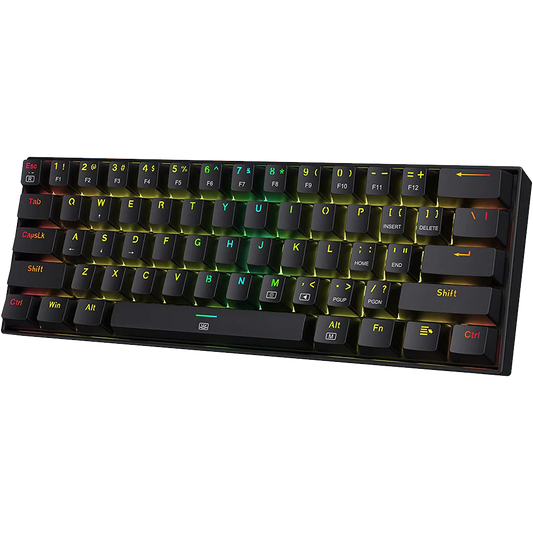
A 60 percent keyboard has approximately 61 keys. The function row, navigation cluster, and arrow keys are all removed from the physical layout. All of these are accessible via function layers, meaning you press the Fn key in combination with other keys to reach them. The keyboard is approximately 290 mm to 295 mm wide.
The 60 percent layout is popular for desk aesthetics and portability. It is also the layout most associated with the custom keyboard hobby community. On r/mkindia, 60 percent keyboards appear frequently in desk setup posts.
The practical adjustment is significant. Arrow key navigation requires a layer hold. Function keys require a layer hold. If your work involves any of these regularly, the 60 percent layout requires deliberate retraining. Most users who try a 60 percent keyboard and abandon it report that the arrow key layer was the deciding factor.
• Who it suits: Users who primarily type text, primarily code using keyboard-centric editors like Vim or Neovim (where arrow keys are less used), and users who prioritise desk space and portability.
• Who it does not suit: Beginners switching from full-size, anyone using arrow keys frequently, and users who rely on function keys in their daily workflow.
How to Choose the Right Keyboard Size for Your Use Case
The right size depends on three questions: whether you need a numpad, whether you use function keys regularly, and how much desk space you have.
• Need a numpad for regular data entry: Full-size or 96 percent. Do not compromise on this.
• Use function keys regularly (IDE shortcuts, browser F-keys, etc.): Full-size, TKL, or 75 percent. Avoid 65 percent and 60 percent unless you are prepared to rely on layers.
• Limited desk space or want the mouse closer: TKL, 75 percent, or 65 percent. TKL is the lowest-risk first step down from full-size.
• Portability matters: 65 percent or 60 percent. Lighter and more compact than anything above.
• First mechanical keyboard: TKL or 75 percent. Both are compact enough to improve desk ergonomics without removing keys that cause workflow disruption.
Comparing two sizes within one product line is often more useful than comparing across brands, because everything except the layout stays the same. Our ATK RS63 Air vs RS7 Air comparison does exactly that for a compact 63-key board and a 75 percent board on the same platform.
If you are transitioning from full-size for the first time, TKL is the lowest-risk choice. You lose only the numpad, and every other key is in its standard position. The 75 percent layout is the next step, and suits users who are already comfortable with laptop-style compressed layouts. Check out our other blogs which explains tech and guides you till you get a perfect keyboard match.
Frequently Asked Questions
Which keyboard size is best for gaming?
TKL and 75 percent are the most popular gaming sizes. Both remove the numpad to bring the mouse closer. TKL retains the full key set (minus numpad). The 75 percent layout is slightly more compact but retains function and navigation keys. Most gaming keyboards are available in TKL or full-size. 60 percent and 65 percent are used in competitive gaming but require adapting to arrow key and function key layers.
Is a 60 percent keyboard good for beginners?
It depends on what you use the keyboard for. If you primarily type text and do not use arrow keys or function keys regularly, a 60 percent keyboard is manageable after a short adjustment period. For most beginners transitioning from full-size or laptop keyboards, a TKL or 75 percent layout is a lower-risk starting point.
Can I use a 65 percent keyboard for programming?
Yes, with an adjustment period. The main challenge is the absence of a physical function row. Many IDE shortcuts rely on F-keys. On a 65 percent keyboard, these are accessed via the Fn layer. If your editor supports extensive key remapping (VS Code, JetBrains IDEs, Neovim), you can reassign shortcuts to avoid the Fn layer. If you rely heavily on default F-key assignments, the 65 percent will require habit changes.
What is the difference between TKL and 75 percent?
Both remove the numpad. TKL (87 keys) keeps each key section in its standard position with full gaps between sections. The 75 percent layout (84 keys) compresses the sections together, bringing navigation keys adjacent to the main alphanumeric area. TKL is approximately 360 mm to 370 mm wide. A 75 percent board is approximately 320 mm to 330 mm wide. TKL has no relocated keys. The 75 percent layout typically has a shorter right Shift key.
Which keyboard size is most popular in India?
Based on activity on r/mkindia and product availability on Indian retailers, TKL and 75 percent are the most discussed and purchased sizes among mechanical keyboard enthusiasts. Full-size remains dominant in general consumer purchases due to familiarity and availability in mainstream retail stores.
Choosing the Size That Fits Your Setup
Every keyboard size involves a trade-off between compactness and direct key access. Full-size gives you everything without compromise. 60 percent gives you the smallest footprint with the steepest learning curve. TKL and 75 percent sit in the middle, offering most of the functionality of full-size in a smaller package that suits most desk setups.
If you are unsure, start with TKL. It is the most widely available, the easiest to adapt to from full-size, and the format where the broadest range of switches, cases, and keycap sets are available in India.