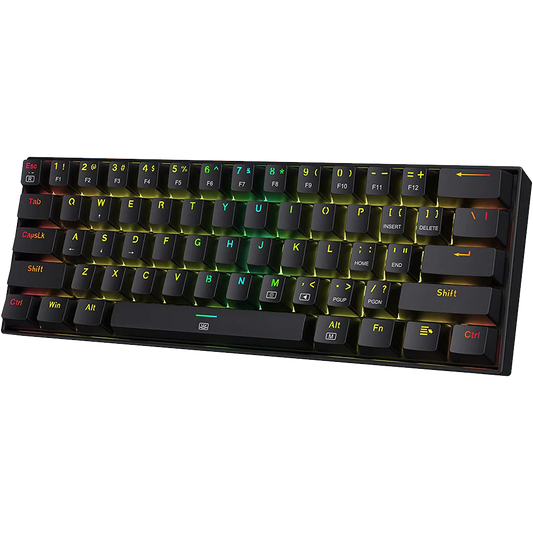

If you have ever wanted to change the way your keyboard feels without buying a new one, hot-swappable keyboards give you exactly that option. You pull out the existing switches, press in new ones, and the entire typing experience changes in a few minutes. No soldering iron. No technical expertise. No risk of damaging the PCB.
This guide explains what hot-swap means, how the mechanism works, which switch types you can use, and what to look for when buying a hot-swap keyboard in India.

What Hot-Swappable Means?
A hot-swappable keyboard uses socketed switch mounts on the printed circuit board. Each socket has metal contacts that grip the switch pins when you press the switch in. You can remove the switch by hand using a switch puller tool and install a new one without any heat or adhesive.
The term "hot swap" comes from server hardware, where it describes replacing components without shutting the system down. In keyboards, it simply means changing switches while the board remains intact. The result is a keyboard where the feel and sound can be adjusted over time as your preferences change.
While testing at Vrkaa, we found that usually mechanical keyboards at a price above ₹2700 comes with a keycap puller & switch puller in the box itself and you don't have to purchase it separately
How Hot-Swap Sockets Work
Kailh and Mill-Max Sockets
Two socket types dominate the market. Kailh hot-swap sockets are the most common and are found in budget and mid-range boards. They use a two-pin brass clip that grips the MX-style switch pins. Mill-Max sockets are used in higher-end boards and are slightly more durable, rated for a greater number of swap cycles. Both types accept standard MX-style switches, which cover the vast majority of aftermarket options available in India.
Pin Compatibility
Standard MX-style switches have two pins. Some switches, such as certain variants of the Gateron G Pro, have three or five pins. A three-pin switch can be placed in a two-pin socket if the extra plastic pin is clipped off. Five-pin switches require a five-pin socket board and cannot be modified down. Always check the pin count of your board and your target switch before purchasing.
Switch Types Compatible with Hot-Swap Boards
|
Switch Type |
Feel |
Sound |
Best For |
|
Linear (e.g., Red, Yellow) |
Smooth, no bump |
Low thock |
Fast typists |
|
Tactile (e.g., Brown, Clear) |
Bump at actuation |
Moderate |
Typing, mixed use |
|
Clicky (e.g., Blue, Green) |
Bump + audible click |
Loud, high-pitched |
Typing, not offices |
|
Silent Linear (e.g., Red Silent) |
Smooth, dampened |
Very quiet |
Office, WFH |
Why Hot-Swap Matters for Buyers in India
The mechanical keyboard market in India has grown significantly since 2022. Boards like the Aula F75 brought high-value features to the ₹3,000-5,000 range. Hot-swap support is now a standard expectation in this segment. For Indian buyers, the practical benefit is cost efficiency: instead of purchasing a second keyboard when you want a different feel, you buy a ₹500-800 pack of switches and swap them in.
The r/mkindia community frequently cites switch experimentation as one of the primary reasons to choose a hot-swap board as a first purchase. Starting with linear switches and later trying tactile options is a common progression. A soldered board locks you into the original switch choice permanently.
What to Check Before Buying a Hot-Swap Keyboard in India
Socket Type and Durability Rating
Most budget boards use Kailh sockets. These are rated for approximately 100 insertion cycles, which is far more than most users will ever perform. If you plan to swap switches frequently for testing, look for boards that specify Mill-Max or reinforced sockets. The rating is usually listed in the official product spec sheet.
PCB Mount vs Plate Mount
Some hot-swap boards are PCB-mount only, meaning the switch sits directly in the PCB socket without a plate. Others use a plate that the switch clips into first, and then the pins enter the PCB socket. Plate-mount boards tend to have a firmer, tighter feel. PCB-mount boards offer slightly more flex and a softer bottom-out. Neither is universally better. Your preference depends on how much give you want in the typing surface.
Gasket vs Top Mount Construction
Hot-swap is a PCB feature. The case construction is a separate decision. A gasket-mount hot-swap board gives you both acoustic flexibility (from the gasket) and switch flexibility (from the sockets). A top-mount board with hot-swap sockets is more rigid but still allows switch changes. For buyers in the ₹3,000-6,000 range in India, most hot-swap boards are top-mount. Gasket-mount hot-swap boards typically start at ₹5,000 and above.
Hot-Swap Keyboards Available at Vrkaa
Vrkaa stocks multiple keyboards with hot-swap support across the ₹3,000-8,000 range. The lineup spans 65%, 75%, and TKL form factors, with both wireless and wired options.
How to Swap Switches: Step by Step
1. Remove the keycap using a keycap puller, pulling straight up with even pressure on both sides.
2. Insert the switch puller tool into the two clips on the side of the switch housing. Squeeze and pull straight up.
3. Check the new switch pins are straight. Bent pins are the most common cause of socket damage.
4. Align the new switch over the socket with the LED cutout facing the correct direction (usually north or south depending on board design).
5. Press down firmly and evenly until the switch snaps into the plate and the pins seat fully in the socket.
6. Test each key in a keyboard tester before reinstalling the keycap.
Common Mistakes When Swapping Switches
• Forcing a switch in with bent pins: This damages the socket permanently. Always inspect pins first.
• Using the wrong puller type: Keycap pullers and switch pullers are different tools. A keycap puller used on a switch will scratch or crack the housing.
• Swapping on a dirty PCB: Dust in the socket can cause intermittent contact. Clean the socket with compressed air before inserting a new switch.
• Installing a five-pin switch in a two-pin board: The extra pins will prevent the switch from seating and may damage the PCB.
FAQ: Hot-Swappable Keyboards
Can I use any switch in a hot-swap board?
You can use any MX-compatible switch that matches the pin count of your PCB. Two-pin MX switches work in virtually all hot-swap boards. Five-pin switches require a five-pin socket board. Alps-style or Topre-style switches are not compatible with MX sockets.
Do hot-swap sockets wear out?
Kailh sockets are rated for around 100 insertion cycles per switch position. Most users swap switches far fewer times than this. If you plan to test many different switches over time, the sockets will outlast your interest in the process. Socket failure is uncommon and usually the result of forcing bent pins rather than normal wear.
Is lubing switches still worth it on a hot-swap board?
Yes. Lubing reduces spring noise and smooths the keystroke regardless of whether the board is hot-swap. The benefit of hot-swap is that you can also lube switches outside the board on a switch opener before installing them, which is significantly easier than lubing in place.
What is the price range for hot-swap keyboards in India?
Entry-level hot-swap boards in India start at approximately ₹2,500. Mid-range boards with gasket mounts and wireless connectivity are available in the ₹4,000-6,000 range. Premium hot-swap boards with aluminium cases and Hall Effect sensors can reach ₹8,000-15,000. Most buyers in India start in the ₹3,000-5,000 range.
Will swapping switches void my warranty?
Most manufacturers that ship hot-swap boards explicitly support switch swapping as an intended use. Check the warranty terms for your specific board. Vrkaa's return and warranty policy covers manufacturing defects in the PCB and sockets under normal use.
A hot-swap keyboard is one of the most practical upgrades a keyboard enthusiast in India can make. It keeps the door open for change without requiring a new board every time your preferences shift. The mechanism is simple, the process is reversible, and the cost of entry in 2026 is lower than it has ever been.