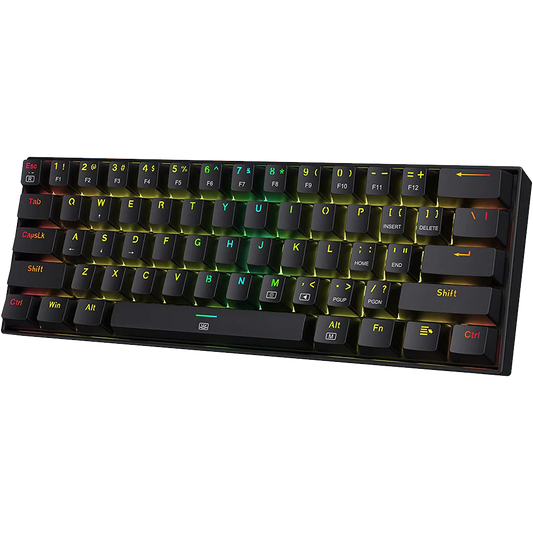

When you start looking at mechanical keyboard, the first question that comes up is almost always about switches. The switch is the single component that has the most direct effect on how a keyboard feels and sounds to type on. Choosing the wrong type can make a keyboard frustrating to use, even if it is well-built in every other respect.
This guide explains the three main switch types available in India: Linear, Tactile, and Clicky. It covers how each type works, what it feels like, which scenarios each is suited for, and which specific switches you are likely to encounter at common price points. The goal is to give you enough technical grounding to make a confident choice, whether you are buying your first mechanical keyboard or switching from one type to another.
Due to the rising popularity of Aula F75, lots of Vrkaa customers chose Linear switches like Reaper & Ice Vein from Leobog
Mechanical Keyboard Switch
A mechanical keyboard switch is a small electromechanical component underneath each keycap. When you press a key, the switch stem moves down a housing, makes electrical contact at the actuation point, and registers a keystroke. The stem then continues to the bottom-out point if you press fully. The spring pushes it back up when you release the key.
Three physical parameters define how a switch behaves:
* Actuation force: the force in grams required to register a keypress. Common values range from 35 gf to 80 gf. Lower values feel lighter to type on; higher values require more deliberate pressure.
* Pre-travel distance: the distance the key travels before actuation, measured in millimetres. Most switches actuate between 1.5 mm and 2.2 mm.
* Total travel distance: the full distance from top to bottom-out, typically 3.5 mm to 4.5 mm for most switches.
The difference between linear, tactile, and clicky switches lies in what happens between the top position and the actuation point.

Tactile Switches:
How Tactile Switches Feel
A tactile switch has a small physical bump partway through the keystroke. The bump occurs at or just before the actuation point. When your finger crosses the bump, you feel a slight resistance followed by a release. This tactile feedback tells you the key has registered without you having to bottom out the switch. Experienced typists use this feedback to type more efficiently by not pressing all the way down on every keystroke.
Tactile switches are louder than linear switches because of the bump mechanism, but quieter than clicky switches because there is no audible click mechanism. The primary sound they produce is the impact of the keycap on the keyboard case, which is common to all mechanical switches unless you add O-rings or switch pads.
Popular Tactile Switches Available in India
|
Switch |
Actuation Force |
Bump Position |
Sound Level |
Price Range (India) |
|
Gateron Brown |
45 gf |
Top of travel |
Moderate |
~1.80-2.20 per switch |
|
Outemu Brown |
45 gf |
Top of travel |
Moderate |
~0.80-1.20 per switch |
|
Akko CS Vintage White |
35 gf |
Mid-travel |
Low-moderate |
~2.50-3.50 per switch |
|
Boba U4 |
62 gf |
Mid-travel |
Very low (silent) |
~4.00-6.00 per switch |
|
Gateron G Pro Brown |
55 gf |
Top of travel |
Moderate |
~2.00-2.80 per switch |
Gateron Brown is the most common tactile switch found in budget and mid-range mechanical keyboards sold in India. The tactile bump on Gateron Brown is mild, which makes it easy to adjust to if you are coming from a membrane keyboard. Some enthusiasts find the Gateron Brown bump too subtle to be satisfying and prefer heavier tactile switches like the Boba U4 or Akko CS Vintage White, which have a more pronounced bump profile.
Who Should Use Tactile Switches
* Typists: especially those who type long documents, code, or write extensively. The tactile bump provides feedback that helps you type with less effort over long sessions.
* Office users: tactile switches are quiet enough for most office environments and offer better typing feedback than linear switches for text-heavy work.
New mechanical keyboard users: tactile switches are a natural introduction to the mechanical keyboard experience because they offer noticeable feedback without the loudness of clicky switches.
Example: Logitech G413 SE

Clicky Switches:
How Clicky Switches Feel and Sound
A clicky switch produces both a tactile bump and an audible click sound at the actuation point. The click is generated by a small mechanism inside the switch housing: either a click jacket (as in Kailh Box switches) or a click leaf (as in Cherry MX Blue derivatives). The click is sharp and distinct. Clicky switches are the loudest of the three types.
The sound of a clicky switch in a quiet room is clearly audible. In an office with multiple people, a keyboard with clicky switches will draw attention. This is a practical concern if you share a workspace or take calls frequently. At home or in a private office, the click sound is generally considered satisfying by enthusiasts and can make extended typing sessions more enjoyable.
Popular Clicky Switches Available in India
|
Switch |
Actuation Force |
Click Mechanism |
Sound Level |
Price Range (India) |
|
Gateron Blue |
60 gf |
Click jacket |
High |
~1.80-2.20 per switch |
|
Outemu Blue |
60 gf |
Click jacket |
High |
~0.80-1.20 per switch |
|
Kailh Box White |
45 gf |
Click bar |
High, crisp |
~3.00-4.00 per switch |
|
Kailh Box Navy |
75 gf |
Click bar |
Very high |
~3.00-4.50 per switch |
|
Gateron Green |
80 gf |
Click jacket |
Very high |
~2.00-2.50 per switch |
Kailh Box White is generally considered superior to Gateron or Outemu Blue because the Box design protects the switch from dust and moisture ingress through the sides. The click bar mechanism in Box switches also produces a crisper sound with less wobble than click jacket designs. For India's humidity and dust conditions, the Box design offers a practical durability advantage.
Who Should Use Clicky Switches
* Home users who type alone: clicky switches are satisfying for long typing sessions where noise is not a concern.
* Writers and coders: the audible feedback of a clicky switch can help you maintain a consistent rhythm when typing intensively.
* Users who want the classic mechanical keyboard experience: clicky switches are the original mechanical keyboard sound, and for many people, they define what a mechanical keyboard feels like.
Example: Redragon Kumara K552

Linear Switches:
How Linear Switches Feel
A linear switch has a completely smooth keystroke from top to bottom-out. There is no bump, no click, and no change in resistance as the stem travels down. The actuation happens silently at a specific point in the downward travel, and you only know you have registered a keypress if you are watching the screen or you have trained yourself to stop pressing at a consistent depth.
Linear switches are the fastest to actuate in terms of key travel because there is no tactile bump to pause at. This makes them popular with gamers who do rapid repeated keypresses, though the speed advantage over tactile switches is marginal in practice for most users.
Popular Linear Switches Available in India
|
Switch |
Actuation Force |
Pre-travel |
Sound Level |
Price Range (India) |
|
Gateron Red |
45 gf |
2.0 mm |
Very low |
~1.50-2.00 per switch |
|
Gateron Yellow |
35 gf |
2.0 mm |
Very low |
~1.50-2.00 per switch |
|
Outemu Red |
45 gf |
2.0 mm |
Low |
~0.80-1.20 per switch |
|
Akko CS Silk |
35-40 gf (varies) |
1.9 mm |
Very low |
~2.00-3.00 per switch |
|
Gateron Ink Black |
60 gf |
2.0 mm |
Very low |
~4.00-6.00 per switch |
Gateron Red and Yellow are the most commonly recommended entry-level linear switches for India. Gateron switches are noticeably smoother than Outemu Red at a similar price point. If your keyboard comes with Outemu Red switches and you want a smoother feel, lubing the switches (applying a thin layer of keyboard lubricant to the stems and rails) closes most of the gap.
Who Should Use Linear Switches
* Gamers: especially those who play titles requiring fast, repeated keystrokes such as FPS games or rhythm games.
* Typists who prefer a quiet keyboard: linear switches with no click noise are appropriate for shared office spaces or late-night sessions.
* Users who have tried tactile switches and find the bump distracting: some people prefer the consistency of a straight downward press.
Example: Redragon Dragon Born K630, Aula F75

Comparing the Three Switch Types: A Quick Reference
Everyone have PREFERENCES.
|
Property |
Linear |
Tactile |
Clicky |
|
Feel |
Smooth, no bump |
Bump at actuation |
Bump + click at actuation |
|
Sound |
Very quiet |
Quiet to moderate |
Loud, sharp click |
|
Actuation feedback |
None (press by feel) |
Physical bump |
Physical bump + sound |
|
Best for gaming |
Yes |
Yes |
Possible, less common |
|
Best for office |
Yes (quiet) |
Yes |
No (too loud) |
|
Best for typing |
Subjective |
Generally yes |
For users who like click |
|
Typical actuation |
35-60 gf |
45-62 gf |
45-80 gf |
Switch Brands Available in India: What to Expect
The Indian mechanical keyboard market at budget and mid-range price points is dominated by Outemu, Gateron, and increasingly Akko switches. Here is what to expect from each:
* Outemu: the most common switch in budget keyboards under 3000 rupees. Functional and adequate, with a slightly scratchy feel compared to Gateron. Lubing improves the feel significantly. A large proportion of keyboards from brands like Redragon and Zebronics use Outemu.
* Gateron: step up in smoothness from Outemu, available in most switch types. Gateron switches are the standard recommendation on r/mkindia for users who want a better baseline feel without spending on premium switches.
* Akko CS: a newer range with interesting tactile profiles. The Akko CS Vintage White and CS Matcha Green are popular tactile options. Akko switches require more research before buying because the range is wide and not all variants are equally well-regarded.
* Kailh: available in Box format, which offers better dust and moisture resistance. The Kailh Box White and Box Red are the most common variants in the Indian market.
Frequently Asked Questions
Which switch is best for gaming in India?
Linear switches are the most popular choice for gaming because of the smooth keystroke and absence of a bump that could slow down repeated keypresses. Gateron Red and Gateron Yellow are the standard recommendations at budget price points. Tactile switches also work well for gaming. Clicky switches are used by some gamers but are less common in competitive settings.
Which switch is best for typing long documents?
Tactile switches are generally preferred for extended typing sessions because the bump at actuation provides feedback that lets you type with less physical effort. Gateron Brown is the entry point. If you want a more pronounced tactile experience, consider Akko CS Vintage White or Boba U4, both of which are available through enthusiast retailers in India.
Are clicky switches allowed in exams or libraries?
No. Clicky switches are audible enough to disturb others in quiet settings. If you plan to use a keyboard in an exam hall, library, or shared office, choose linear or tactile switches instead.
What is the difference between Gateron Brown and Cherry MX Brown?
Cherry MX Brown is the original tactile switch that popularised the tactile type. Gateron Brown is a close derivative that many users and testers describe as slightly smoother in travel. Both have a mild tactile bump. Cherry MX switches are harder to find at competitive prices in India. Gateron Brown is more widely available and offers comparable performance at a lower price.
Can I change switches on my keyboard?
Only if your keyboard has hot-swap sockets. Hot-swap sockets allow you to remove and insert switches without soldering. Not all keyboards have this feature. If your keyboard is soldered, changing switches requires desoldering the existing switches and soldering in the new ones. This is a skill that takes practice and requires basic equipment. If switch flexibility matters to you, choose a hot-swappable board when you buy.
Closing Notes
The switch type you choose defines a large part of your daily experience with a mechanical keyboard. Linear switches suit users who want a quiet, smooth keystroke. Tactile switches offer feedback that most typists find helpful once they adjust to it. Clicky switches are for users who value the auditory confirmation and are in an environment where noise is acceptable.
If you are unsure which type to start with, tactile switches are the safest introduction. The feedback helps you understand what a mechanical switch is doing differently from a membrane keyboard, and the sound level is manageable in most environments. From there, you can move to linear or clicky based on what you find yourself preferring after a few weeks of use.