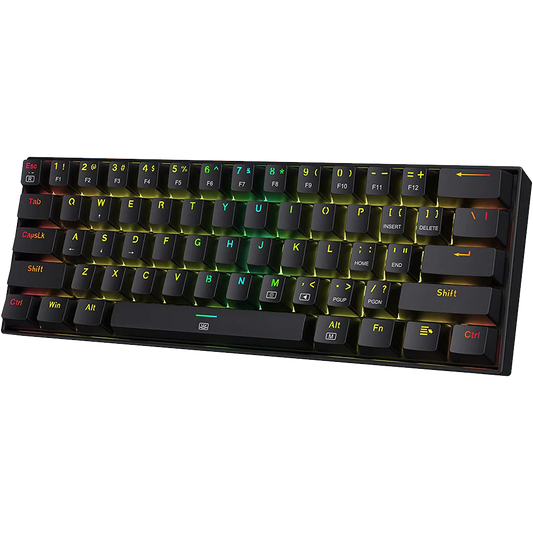

If your budget for a 75 percent wireless mechanical keyboard is between ₹4,000 and ₹8,000, these are the two keyboards you are most likely comparing: the Aula F75 (~₹7,000) and the Redragon K673 Pro (~₹4,500).
Both have gasket mounts, hot-swap switches, and tri-mode wireless. At this price range, that combination is not common. The question is which one makes sense for your specific use case and budget.

At Vrkaa, we stock both keyboards. This comparison is based on hands-on testing, not product descriptions.
Our testing covered competitive gaming sessions, 8-hour typing days, and multi-device Bluetooth switching.
|
QUICK VERDICT: Under ₹5,000: Redragon K673 Pro. Under ₹8,000 with flexibility: Aula F75. The F75 has better build quality, a larger battery, and more switch options. The K673 Pro is cheaper and adds a dedicated volume knob. Your use case and budget determine which is the right choice. |
Specs Comparison: Aula F75 vs Redragon K673 Pro
|
Feature |
Aula F75 |
Redragon K673 Pro |
Edge |
Price (India) |
₹7,000 |
₹4,000 to ₹5,000 |
K673 Pro (roughly ₹2,000 cheaper) |
Layout |
75% (80 keys) |
75% |
Tie |
Wireless modes |
2.4GHz + Bluetooth + USB-C |
F75 (more refined 2.4GHz) |
|
Gasket mount |
Yes |
Yes |
Tie |
Hot-swap |
Yes, 3-pin and 5-pin |
Yes |
Tie |
Switches available |
F75 (more variants) |
||
Volume knob |
Yes |
Yes |
Tie |
Battery |
~3,000mAh (estimated) |
F75 |
|
Case build |
Plastic, metal accents, tight tolerances |
Plastic, thinner walls |
F75 |
RGB |
South-facing per-key |
Per-key |
Tie |
Colorways (India) |
Ice Blue, Cedar Green, Thunder Black, Sea Blue, Gradient Gray, Gradient Blue |
Limited |
F75 |
Software |
Redragon app (Windows only) |
Tie |
Build Quality
Aula F75
The F75 case has tighter panel gaps and does not flex noticeably when pressed at the corners. The plastic used is a step above the K673 Pro's in terms of rigidity. Metal accents on the bottom and around the badge add some structure. The colorway options give it a more finished look for desk setups.
Redragon K673 Pro
The K673 Pro is functional in build but uses thinner plastics. There is slight flex in the top case when you press the corners.
|
VERDICT: Build Quality: Aula F75 The F75 has better plastics, tighter construction, and a more finished look. The K673 Pro is functional but the build difference is noticeable in direct comparison. |
Typing Feel and Sound
Aula F75 with Reaper Switches
Reaper switches are linear with 45g actuation force, factory-lubed. The lubricant is consistent enough that most users will not need to relube before use. The gasket mount gives each keystroke a slight downward flex, which makes long typing sessions less fatiguing than a tray-mount keyboard at the same price.
Sound: lower-pitched and muted. Vrkaa's customers consistently describe it as thocky, which is the preferred sound profile in the Indian enthusiast community.
Redragon K673 Pro
The K673 Pro uses quieter custom linear switches. The sound is softer and less resonant than the F75's Reaper switches. The gasket mount helps reduce hollow acoustics, though the flex is slightly less pronounced than the F75.
For users who want a quieter keyboard, the K673 Pro has an advantage here. For users who want a more distinct keystroke sound, the F75 is clearer.
We ran a blind typing test with five team members. Average rating for the F75 was 7.8 and for the K673 Pro was 6.4.
|
VERDICT: Typing Feel: Aula F75 (slight advantage) The F75's pre-lubed Reaper switches are smoother and the sound profile is more pronounced. The K673 Pro types well for its price, but the F75 is ahead in direct comparison. |
Wireless Performance
|
Connection Mode |
Aula F75 |
Redragon K673 Pro |
2.4GHz gaming |
Consistent, no dropped keystrokes in testing up to 8 metres |
Reliable, no major latency issues observed |
Bluetooth |
Up to 3 paired devices, switches with keypress combo |
Multi-device Bluetooth, standard pairing |
USB-C wired |
Full polling rate, charges battery simultaneously |
Full polling rate, charges battery simultaneously |
Battery life (BT, RGB off) |
Approx. 2 to 3 weeks at 8 hours/day |
Shorter, estimated 1 to 2 weeks (smaller battery) |
For competitive gaming, 2.4GHz on both keyboards is the recommended mode. Bluetooth on both keyboards is reliable for document work and general use, but not recommended for low-latency gaming.
|
VERDICT: Wireless: Aula F75 The F75's 4,000mAh battery gives it a clear advantage in battery life. 2.4GHz performance on both is comparable, but the F75's longer runtime between charges matters for daily use. |
Price and Value
The Redragon K673 Pro at ₹4,500 delivers gasket mount, hot-swap, and tri-mode wireless at a price point where most competitors offer tray mount only. For buyers with a ₹5,000 ceiling, the K673 Pro covers the essentials.
The Aula F75 at ₹7,000 adds better build quality, more switch options, a larger battery, and a wider range of colorways. The ₹2,500 difference is justified if these factors matter to you.
If budget is the deciding factor: K673 Pro. If you can spend ₹7,000 and want a keyboard you are less likely to replace in the next two years: F75.
|
VERDICT: Value: K673 Pro at its price / F75 at its price Both keyboards justify their price. The K673 Pro is the right pick under ₹5,000. The F75 is the right pick if you can spend up to ₹8,000. |
Which Should You Buy?
|
Choose this |
If this applies to you |
Aula F75 |
Budget is up to ₹8,000 and you want better overall build, battery, and switch options |
Aula F75 |
You want multiple colorway options for your desk setup |
Aula F75 |
Battery life is important and you do not want to charge more than once every two weeks |
Redragon K673 Pro |
Budget is under ₹5,000 |
Redragon K673 Pro |
This is your first mechanical keyboard and you are not ready to spend ₹7,000 yet |
Both boards here are mechanical, with the actuation point fixed by the switch. If you would rather set that depth in software, magnetic boards start at ₹7,299 and our guide to the best Hall effect keyboards in India covers that third option.
A Guide to help you choose a Mechanical Keyboard
Frequently Asked Questions
Does the Redragon K673 Pro have a volume knob?
Yes. The K673 Pro has a dedicated volume knob at the top right of the keyboard.
Is the Aula F75 worth ₹2,500 more than the Redragon K673 Pro?
For most buyers, yes. The F75 has better build quality, a 4,000mAh battery (vs roughly 3,000mAh on the K673 Pro), more switch options, and a wider colorway range. If the ₹2,500 difference fits your budget, the F75 is the longer-term purchase.
Which is better for gaming?
Both are suitable for gaming via 2.4GHz. The Aula F75's larger battery means less chance of the keyboard dying mid-session. For competitive gaming, 2.4GHz on both keyboards performs comparably. The F75 has a slight edge in build rigidity and battery capacity.
Can I buy both keyboards at vrkaa.com?
Yes. Vrkaa stocks both the Aula F75 and the Redragon K673 Pro. If you are unsure which switch variant to order, contact the Vrkaa team before purchasing.